Shein Free Trial Center Manual: Applying Step by Step
Shein Free Trial Center manual: product groups, application limits, result tracking, report submission and correcting a Failed review.
Advertisement
Trial items featured in specific campaigns can be requested by applicants through the Free Trial Center. Choosing an item and submitting a request, however, represents only the opening phase of a lengthier process.
Available Categories









Availability and timing of each trial item are set by the program's supplier.
Approval is not assured merely by applying.
Applications are submitted and evaluated exclusively within Shein's own app, and the brand is solely responsible for selecting participants. Selected applicants are then expected to try the item and publish a review inside the given timeframe.
Arborixa is an independent informational site with no affiliation to Shein: it does not collect personal data, receive applications or intervene in the selection. Understanding each phase in advance makes it easier to avoid missed submissions and similar problems.
Step one: locate the trials area
First, applicants sign in to their account and find the Free Trial Center. In the app, it is reached through Profile → More Services → Other Services → Free Trial Center. The page that appears displays each trial item whose campaign is currently accepting entries.
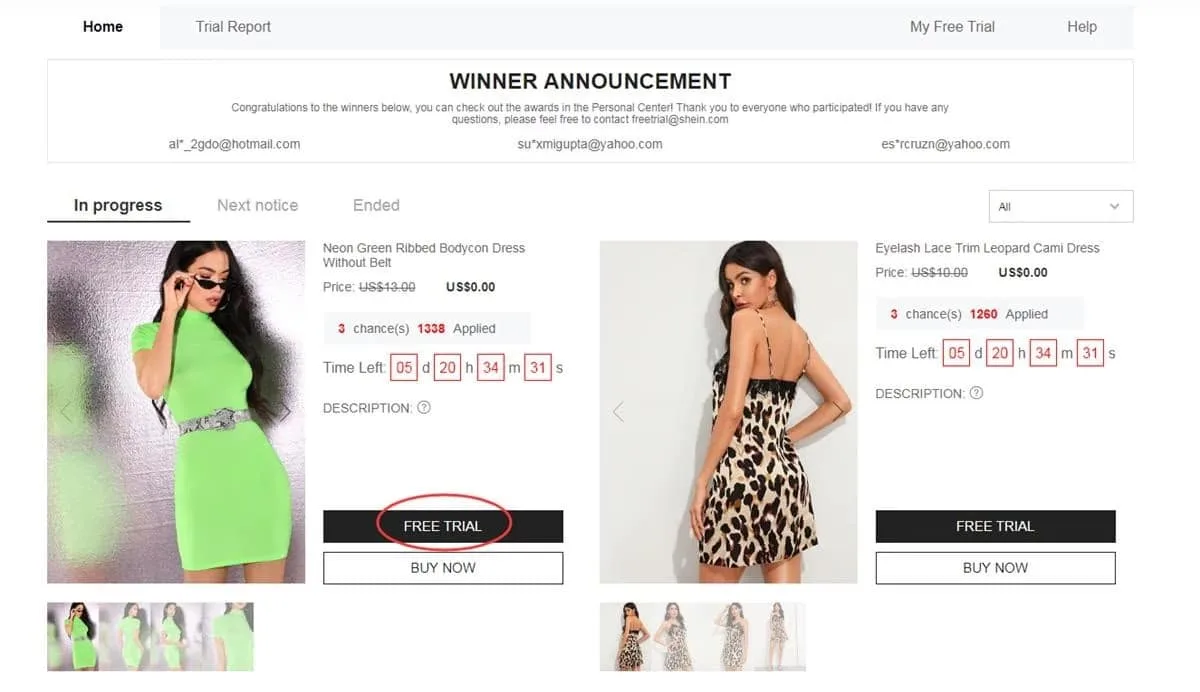
Open campaigns can be reviewed from this area of the account
Next, the desired trial items are chosen
A maximum of 3 applications is permitted to each applicant weekly, and selections not used during a given cycle are lost rather than kept. Prior to choosing, the size should be checked carefully, and the registered address should be confirmed as belonging to the region served by the active store.
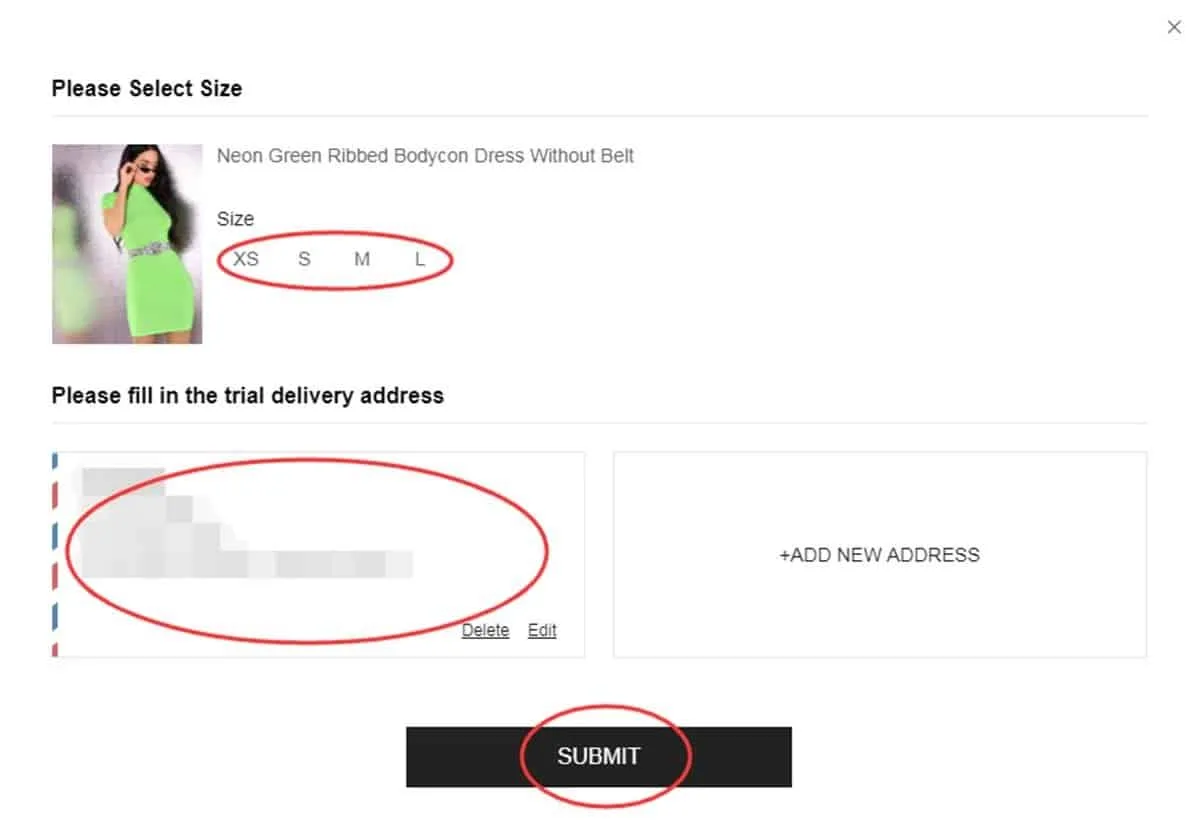
Item choice and delivery data should be reviewed prior to submission
Next, the request's progress is followed
After submission, progress is visible under “My Free Trial” or “My Applications”. A decision is normally displayed after roughly a week. The “Approved” status signals selection for that trial; the “Failed” status signals that the request was not selected on this occasion.
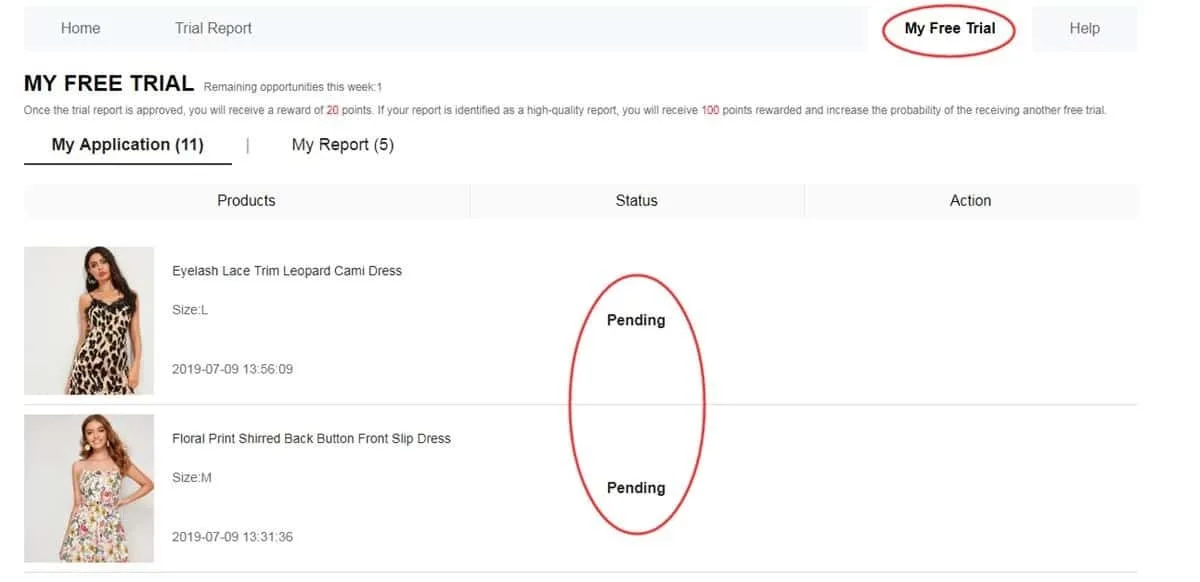
The history lists which requests have moved forward in the process
Next, the delivered item is tested
On arrival, the approved trial item should be used before any report is written. Material, finish, comfort, size, appearance and overall quality are the aspects to be observed. The review must be grounded in real use, accompanied by original photos and submitted within a maximum of 10 days.
A detailed review, illustrated with photos taken by the applicant, is then published
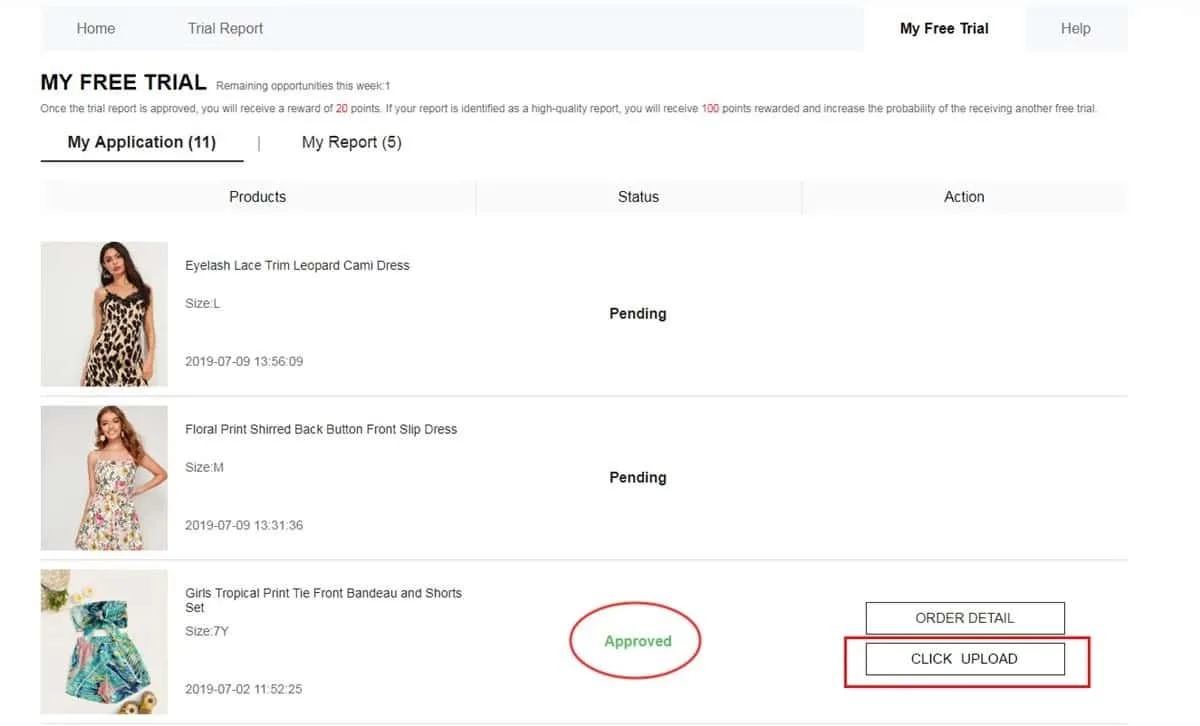
Finally, the report's acceptance is verified
Upon completion of the review, its outcome is shown under My Report. For each approved report, 20 points are normally added to the account balance. If the review is further rated a “High-Quality Report”, a bonus of 100 points may be granted. Approval in future campaigns is not secured by this reward.
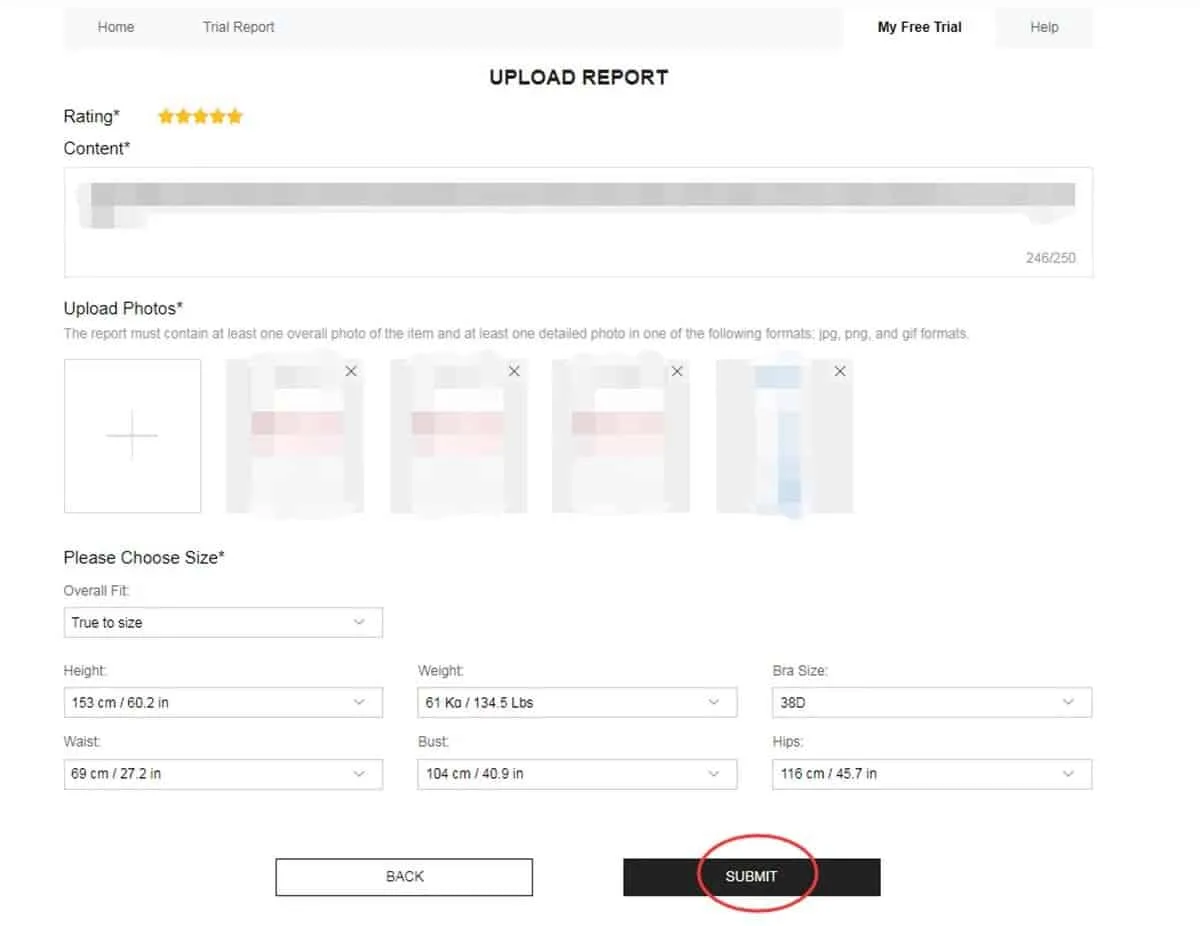
Assessment results and associated points are displayed in this area
Revising a report given a second opportunity
Not every review is accepted at the first evaluation. A report marked Failed should be checked for an available Rewrite option. Where that option appears, the text can be revised, helpful specifics added and any photos that are dark, unfocused or unclear replaced.
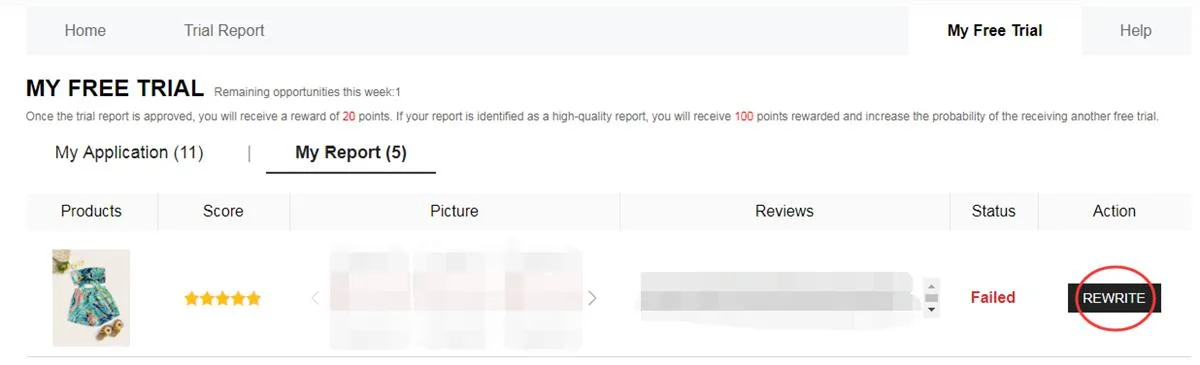
If activated, Rewrite permits the content to be corrected and resubmitted
The path between application and review
First, the open campaigns are browsed and appealing trial items are selected. The catalog is updated over time, so the products shown in one week are not necessarily those found in the next round.
Next, an assessment phase follows. Shipment of the item has not yet been confirmed at this point, because each application relies on the result shown later in the dashboard.
After approval, the trial item is dispatched to the registered address. Delivery marks the start of the testing phase, in which the product's different features are to be examined by the applicant.
Finally, the report is submitted. Beyond meeting the deadline, applicants are expected to provide original, useful writing along with images that faithfully depict the item received.
Which product groups can appear in campaigns?
The trial items depend on current availability, but a number of segments are commonly found in the catalog:
- Clothing: jeans, blouses, dresses, coats, t-shirts, sportswear and further clothing pieces.
- Beauty and personal care: cosmetics, skin treatments and items used in everyday personal care.
- Fashion accessories: shoes, bags, jewelry, fashion accents and similar finishing pieces.
- Household and storage: kitchen tools, decorative objects, storage solutions and goods for different rooms.
A previous rejection does not determine the result of future requests.
Every round also provides an opportunity to review personal data and submit correct information.
Qualities of a helpful review
A strong report goes beyond stating whether the item was liked. Concrete observations from actual use should be included:
• Positive points should be described, and areas for improvement identified.
• Sizing, fabric or material, finish, comfort and real appearance are worth addressing.
• Photos should be original, taken in good lighting and from angles where the item is clearly visible.
• Observations useful to future buyers of the same product are recommended.
Common mistakes to be avoided
Many problems are prevented by a quick review before each step is completed:
❌ Profile information left incomplete or outdated.
❌ A delivery address registered outside the selected store's region.
❌ Items confirmed before size and other listed details have been checked.
❌ Reports so brief that the item's actual performance is not described.
❌ Low-quality images in which the product cannot be clearly seen.
❌ Missing the review deadline, which is a maximum of 10 days.
❌ The Rewrite option left unused even though it has been made available.
❌ Information supplied that does not match the genuine data needed for participation.
Core rules of the program
• A ceiling of 3 applications applies each week; choices left unspent are lost at the end of that cycle.
• The registered address has to belong to the country or region tied to the store in which the request was made.
• Standard shipping is covered by the program; customs rules and associated fees, however, may vary according to destination.
• After delivery, a set period is given to applicants for completing and submitting the mandatory report.
• Reviews that were rejected can sometimes receive the Rewrite option, so changes are made prior to reassessment.
• False information or account misuse may result in restrictions or exclusion from later participation.
• Applicants taking part in trials are responsible for following each step correctly and completing their reports.
Applicant questions
Does applying involve any fee?
No payment is required to request a product via the Free Trial Center. Selection, however, is not assured by submitting an application.
How many applications fit into a week?
Up to 3 products may be requested in each weekly cycle. Unused options are not transferred to the following week.
Can applicants apply again after a rejection?
Yes. A rejected request affects only that specific opportunity. New campaigns can be monitored, and additional requests submitted whenever trial items become available.
How is a review needing correction identified?
The My Report section should be opened. If the review shows Failed and the Rewrite option is available, the content can be revised and resubmitted.
Prefer a more detailed walkthrough?
A step-by-step explanation of the Free Trial Center is available, covering application tracking and proper review preparation for selected applicants.


